

µFR Multi-reader C# SDK with source code software example is an excellent development tool for developing the NFC RFID solutions for multiple µFR readers connected to a single host. This software tool enables centralized control of readers connected to one host, as well as integration with other systems that require communication with multiple readers at the same time.
Docs & Software Download
Software overview
Software functions:
- Open/Close All Readers
- Enable Polling
- Save Log File
- Get Count
- Get Info
- Open/Close By Index
- Read Card/Tag Sector
- Read Card/Tag Block
- Write Card/Tag Sector
- Write Card/Tag Block
Available programming languages:
- C#
- C
- Lazarus
Supported operating systems, platforms, and environments:
- Cross-platform
Supported hardware:
- µFR Series Devices
| Software SDK | Description |
| ufr-Lazarus-multi-reader |
Example of using multiple µFR readers on the same host. |
| ufr-multi_readers-example-c_sharp |
A software example in C# includes basic functions of using the MULTIPLE µFR Series readers on a single host. |
| ufr-examples-c-multi_reader_console |
Console software example for µFR multi-reader. |
Software manual
1. µFR Multi-reader C# – Run Software
Download: ufr-multi_readers-example-c_sharp
Download and extract the SDK software pack. Navigate to the software Release folder in the subfolder with the name of your OS architecture (e.g. binx86Release). Run the uFR_multiDLL_tester.exe file.

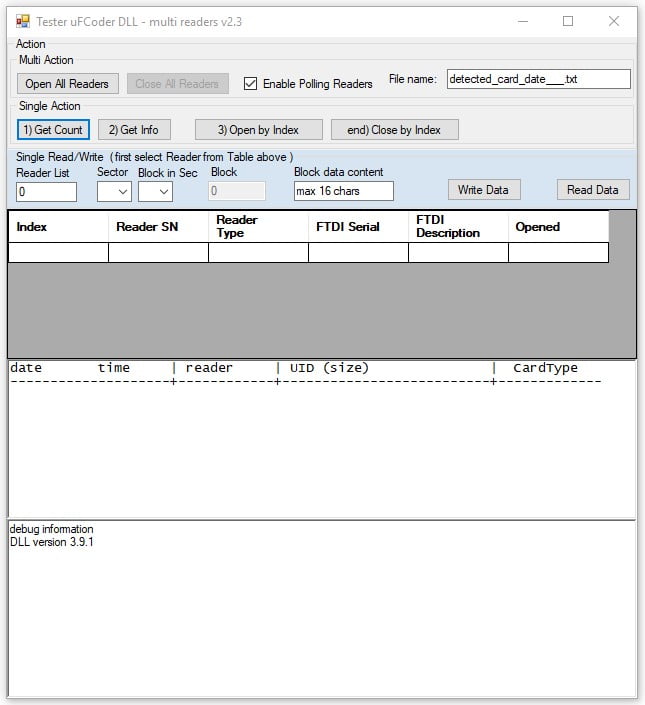
If you have installed your hardware drivers properly, the software will run the graphic interface.

2. µFR Multi-reader C# – Open All Readers
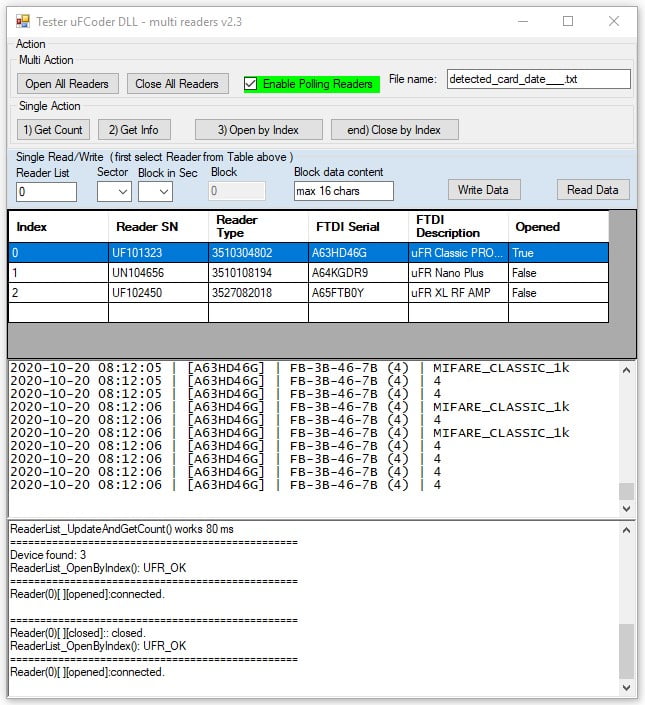
Click the Open All Readers to establish communication with all the uFR devices connected to your host.
If the connection failed, check the FTDI drivers installation.


2. µFR Multi-reader C# – Enable Polling Function
To enable/disable data polling, select or deselect the check box on the top of the software interface.

If the polling option is enabled, this will cause the constant reading of any card in the readers’ reading field, as well as its log recording.
4. µFR Multi-reader C# – Log File
The software stores all reading data into the log file. The initial file name is displayed at the top of the screen. After the first card is read, the software automatically generates the file in the executable software folder.

4.1 µFR Multi-reader C# – Rename Log File
The log file name is editable. Each time you edit the File Name field, the software will generate a new log file.

EXAMPLE
The screenshot below shows the new log file created after editing the default file name.

4.2 µFR Multi-reader C# – Log File Content
When the polling function is enabled, the log file will record all the cards/tags instantly.

5. µFR Multi-reader C# – Get Count Function
Click the Get Count button to count all the µFR readers connected to the host.

6. µFR Multi-reader C# – Get Info function
Click the Get Info button to display all connected µFR device details.

7. µFR Multi-reader C# – Close All Readers
Click the Close All Readers button to terminate the communication with all connected µFR devices.

8. µFR Multi-reader C# – Open By Index
To establish the communication with the connected readers selectively, select the desired reader index from the list and click the Open By Index button. Repeat the steps for all the readers that you want to enable. After enabling the communication by the reader index, the status of all opened readers will be set to True, while the rest of the readers will remain False status.
After enabling the communication by the reader index, the status of all opened readers will be set to True, while the rest of the readers will remain False status.

EXAMPLE
The screenshot shows an example of opening the readers with index 0 and 2, while the reader with index 1 is still closed.

9 µFR Multi-reader C# – Close By Index
To disable the communication with the opened readers selectively, select the desired reader index from the list and click the Close By Index button. Repeat the steps for all the readers that you want to disable. After disabling the communication by the reader index, the status of the disconnected readers will be set to False.
After enabling the communication by the reader index, the status of all opened readers will be set to True, while the rest of the readers will remain False status.

10. µFR Multi-reader C# – Read Function
Use the Sector Reading option or the Block Reading option to read the cards/tags.
Note: This C# software example supports MIFARE® and other compliant cards/tags with a memory structure organized by 16 sectors and 4 blocks. If your project uses the cards/tags with some other memory structure, you can use this software SDK to customize the reading and writing functions.

10.1 µFR Multi-reader C# – Sector Reading Function
To read a specific sector of the card, follow these steps:
- Select the reader index
- Select the desired sector index
- Click the Read Data button.
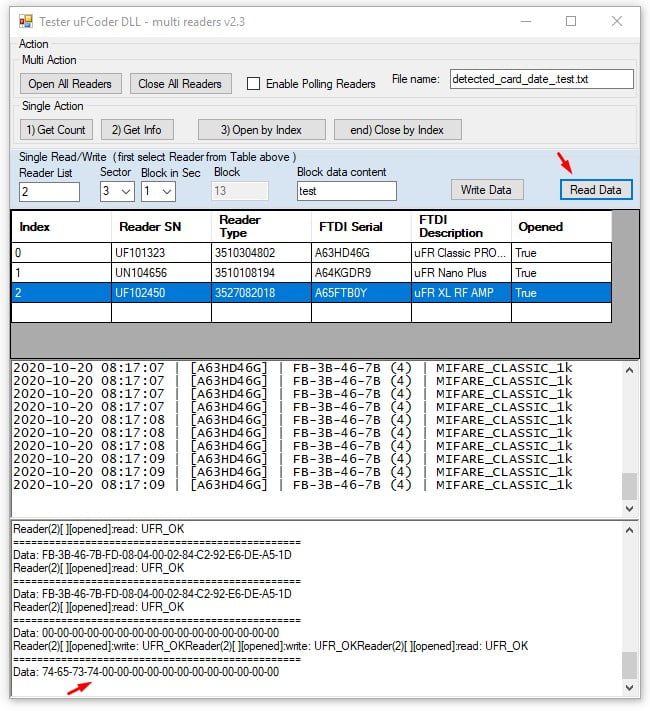
The software info bar will display the content of the selected sector.

10.2 µFR Multi-reader C# – BlockReading Function
To read a specific block of the card, follow these steps:
- Select the reader index
- Select the desired block index
- Click the Read Data button.
The software info bar will display the content of the selected block.

11. µFR Multi-reader C# – Write Function
Use the Sector Writing option or the Writing Reading option to write the content into the cards/tags.
Note: This C# software example supports MIFARE® and other compliant cards/tags with a memory structure organized by 16 sectors and 4 blocks. If your project uses the cards/tags with some other memory structure, you can use this software SDK to customize the reading and writing functions.

11.1 µFR Multi-reader C# – Block Writing Function
To write data into the card, follow these steps:
- Select the reader index
- Select the desired sector index
- Select the desired block
- Enter the new data into the Block Data Content field
- Click the Read Data button.
Note: The defined data length is 16-bytes, so you may enter no more than 16 characters. If you need to write a larger content, split your data into more sectors and blocks. For more complex data writing, you may also consider using some of our other excellent SDK software solutions for linear writing. Please, check our GitLab repository.

11.2 µFR Multi-reader C# – BlockReading Function
To read a specific block of the card, follow these steps:
- Select the reader index
- Select the desired block index
- Click the Read Data button.
The software info bar will display the content of the selected block.1
Check the new entry by reading the selected card block. The software info bar will display the HEX data content.
This manual presents the simple multi-reader source code software in the C# programming language. Software examples with the presented functions are also available in C and Lazarus. All software packages include source code SDK.